Range Slider Filter
Range Slider filters display a slider control that enables you to filter results by a range that you specify by setting a minimum and maximum value. The Range Slider filter requires a property with numeric or date data type, or a function resulting in a number, such as COUNT.
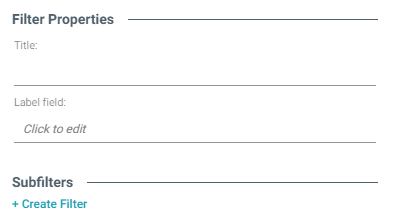
After selecting the appropriate property and choosing Range Slider from the Filter drop-down list, configure the following properties as needed:
| Field | Description |
|---|---|
| Title | Defines the filter title. |
| Label field | The property to show as the value for each list item in the filter if you want it to differ from the value that results from the property or relative path you chose in the Fields field. |
| Create filter | Creates a subfilter for this filter. |
When you have completed the configuration, click OK to create the filter. The new filter appears on the dashboard.
Example
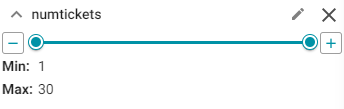
The following example shows a Range Slider filter. To further narrow the possible results from this filter, you can drag the left-hand slider to the right to choose a new minimum value and drag the right-hand slider to the left to choose a new maximum value.
| Field | Description |
|---|---|
Designer ( ) ) |
Click to open the Designer and reconfigure the filter. |
| Close (X) | Click to close the filter and remove it from the dashboard. This action cannot be undone. |